The easiest way to find the right car key cover is to match the cover to your exact key fob, not just your car brand. Check your car model, model year, key type, number and position of buttons, key shape, and emergency-key design before buying. A cover that fits these details should provide easier button access and a more secure fit.
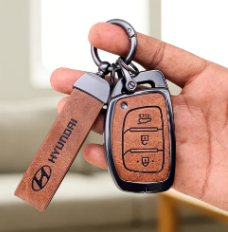
Many key covers are made for specific models and key designs. For example, Cartense lists covers by vehicle models and key types, including two-button, three-button, and four-button smart keys.
Why the Correct Key Cover Matters
A key fob is used every day. It can be placed in pockets, bags, cup holders, or alongside other keys. Over time, the surface may collect scratches, dust, and marks.
A properly fitted cover can add a protective layer around the key while also changing its appearance and grip. However, the cover should not make normal key operation difficult.
The most important factor is fitment. A cover that is too loose may move around the key. One that is designed for a different key shape may not align properly with the buttons.
Cartense also highlights factors such as button operation, durability, and fit when discussing key protection.
Step 1: Identify Your Car Brand and Model
Start with the basics:
- Car brand
- Exact model
- Model year
- Variant or trim, if relevant
- Key type
For example, knowing that you own a Toyota may not be enough. You may need to identify whether the key belongs to a Fortuner, Innova Crysta, Corolla Altis, or another model.
Even vehicles from the same manufacturer can use different key designs.
When searching online, use a specific phrase such as:
“Toyota Fortuner three-button smart key cover”
instead of simply searching:
“Toyota car key cover.”
This makes it easier to find products designed around a particular key shape.
Step 2: Look at Your Actual Key Fob
Your physical key is often the best reference.
Before ordering, look at:
- Overall key shape
- Number of buttons
- Button arrangement
- Button symbols
- Key-ring opening
- Emergency-key slot
- Flip-key mechanism
- Charging or other openings, if present
Take a clear photo of the front and back of the key if you are comparing products online.
Two keys can look similar at first glance but have different button positions or dimensions. This is why checking the actual key is more useful than relying only on the vehicle name.
Step 3: Count the Buttons
Button count is one of the simplest ways to narrow your options.
Common layouts include two-button, three-button, and four-button designs. The functions may include lock, unlock, trunk release, panic, or other vehicle-specific controls.
For example, Cartense offers separate listings for different key configurations, including two-button and three-button Toyota covers and four-button Tata smart-key covers.
| Key Detail | What to Check |
| 2 buttons | Button positions and key shape |
| 3 buttons | Lock, unlock, trunk or other functions |
| 4 buttons | Exact button layout and spacing |
| Flip key | Check hinge and blade access |
| Smart key | Check complete fob shape and openings |
Do not assume that the same number of buttons means the same fit. Shape and button placement still need to match.
Step 4: Check the Key Type
Your vehicle may use a traditional remote, flip key, push-start smart key, or another fob design.
A flip key usually needs space for the folding blade or hinge. A smart key may have a compact body with several buttons and specific openings.
This distinction matters because a cover designed for a flip key may not work with a push-start smart key.
Before buying, look for wording such as:
- Smart key
- Push-start key
- Flip key
- Remote key
- Key fob
- Two-button key
- Three-button key
- Four-button key
The product title and specifications should clearly describe the intended key design.
Step 5: Match the Shape and Dimensions
Even when a product claims compatibility with your car model, check the shape shown in the product images.
Look at the:
- Top corners
- Bottom edge
- Side profile
- Button cutouts
- Key-ring opening
- Emergency-key access
A close visual match is a useful final check before ordering.
For example, some Cartense listings are specifically described for individual model groups and key configurations rather than using one universal shape.
If dimensions are provided, compare them with your key fob. This is especially useful when your vehicle has more than one key design across different years or variants.
Step 6: Choose the Right Material
Once compatibility is confirmed, consider the material.
Silicone
Silicone-style covers are generally flexible and easy to handle. They can be a practical choice if you want a lightweight cover with a softer feel.
Leather
Leather or leather-style covers can provide a more premium appearance and textured feel. They are often chosen when appearance is as important as everyday protection.
Metal and Silicone
Metal-and-silicone designs combine a more rigid outer structure with an inner layer. They can create a more substantial feel but may add some bulk or weight.
Cartense currently offers metal-silicone and metal-leather designs across different vehicle and key configurations.
The material should come after compatibility. There is little benefit in choosing an attractive material if the cover does not properly fit your key.
Step 7: Make Sure Every Button Is Easy to Press
A good cover should not make basic key functions frustrating.
After installation, check whether:
- Lock works normally
- Unlock works normally
- Trunk-release button is accessible
- Panic or additional buttons remain usable
- Button symbols are easy to identify
- The cover does not interfere with the key-ring area
Some model-specific covers use precise openings around the buttons. This type of design can make the controls easier to reach.
If you frequently use your key while driving or approaching your car, simple button access matters more than decorative details.
Step 8: Check Emergency-Key Access
Some smart keys include a hidden or removable emergency key.
Before buying a cover, check whether you can still access the emergency-key release or opening.
This is an easy detail to overlook. A cover may look perfect from the front while making another part of the key difficult to access.
If the product photos show the back and sides of the key, use them to check these areas before ordering.
Step 9: Consider Protection and Daily Use
Think about where and how you normally carry your key.
If the key is usually kept in a pocket with coins or other keys, scratch resistance may be important. If it is carried in a bag, a cover with a secure fit and key-ring attachment may be more convenient.
A cover can help protect against everyday surface wear, but it should not be treated as a guarantee against serious impact or water damage. The protection level depends on the cover’s construction and how it is used.
A Simple Buying Checklist
Before purchasing, ask these questions:
- Does the cover list my exact car model?
- Does the model year or variant match?
- Does the key shape match my actual fob?
- Is the number of buttons correct?
- Are the buttons in the same positions?
- Does the key-ring opening line up?
- Can I access the emergency key?
- Is the material suitable for my daily use?
- Can I press every button comfortably?
- Does the product description clearly state compatibility?
If you can answer yes to these questions, you have a much better basis for choosing a suitable cover.
Common Mistakes to Avoid
Buying by Brand Only
Searching for “Honda key cover” or “Toyota key cover” may produce many different designs. Narrow your search using the model and key type.
Ignoring Button Layout
A three-button cover is not automatically suitable for every three-button key. Check the exact arrangement.
Choosing Style Before Fit
Color, finish, and design are personal choices. Fit should come first.
Forgetting Key Shape
The same vehicle model may have different key designs depending on year, variant, or key system.
Assuming Universal Means Perfect Fit
A universal cover may not provide the same precise fit as a model-specific design.
How do I know which key cover fits my car?
Match your car model, year, key type, key shape, button count, and button layout with the product description.
Should I buy a key cover based on my car model?
Use the car model as a starting point, but always compare the cover with your actual key fob.
Are all three-button key covers the same?
No. Three-button keys can have different shapes, sizes, and button positions.
Can a key cover affect button use?
A poorly matched cover can make buttons harder to access, so check the cutouts and alignment before buying.
Is silicone better than leather for a key cover?
Neither is universally better. Silicone offers a flexible feel, while leather-style designs focus more on appearance and feel.
Do smart keys need special covers?
Yes, smart keys often have specific shapes and button layouts, so choose a cover designed for that particular fob.
Can I use a cover with a flip key?
Yes, but make sure the cover is specifically designed around the flip mechanism and blade.
FAQs
How can I find my car key model?
Check your vehicle documentation and compare your physical key with the compatibility information provided by the cover manufacturer.
Does car year matter when buying a key cover?
It can. Different model years or variants may use different key designs, so include the year when searching.
Should the key cover fit tightly?
It should fit securely without being difficult to install or preventing normal access to buttons and key functions.
What is the most important feature of a key cover?
Correct compatibility is the most important starting point. Material, appearance, and extra features come after fit.
Can I buy a cover if I do not know my key type?
First identify whether you have a smart key, flip key, or another remote design. Comparing photos can also help.
How do I avoid buying the wrong cover?
Compare your actual key with the product photos, button layout, dimensions, and compatibility list before ordering.